Updated November 12, 2026 for Final Fantasy XIV Same-region Player Matching.
Use Eorzea Collection for FFXIV glamour inspiration: browse player outfits for free, open a look, and use its equipment list and dye names to recreate it in game. Patch 7.4 removed class, job and level restrictions from glamour appearances, but race, gender and Grand Company restrictions still apply, and weapons and tools require matching item types.
Browse without an account
Start in the Glamour Collection catalogue and browse the screenshot grid without signing in. You need an account to love or favorite an outfit, follow creators, or submit your own look.
Opening a creator's profile lets you explore their other outfits. We'd start with popular looks when you want an easy visual reference: submission quality varies, and popularity sorting helps surface stronger screenshots.
Use filters to narrow your look
Eorzea Collection's FFXIV catalogue supports job, race, gender, gear tier, item level and color-theme filtering; job options include Disciples of War, Magic, the Hand and the Land. Theme searches can help you find a direction such as a woodland or gothic outfit, and you can search for particular gear sets too.
| Filter | What it helps you find |
| Race and gender | Screenshots on characters closer to yours; gear can drape differently between races. |
| Job and gear tier | Outfits organized around particular jobs and equipment categories. |
| Item level | Looks narrowed by equipment item level. |
| Color and theme | Combinations built around the palette or style you want. |
Use the job filter as a starting point for style rather than your only search: armor appearances can cross class and job boundaries under the current glamour rules. Broaden the search when the first results feel too repetitive.
Read the outfit page before collecting pieces
An outfit's detail page identifies the author, lists its equipment by slot, gives the exact dye colors, and provides item links to Lodestone entries or equivalent item information. Follow those item links to identify the actual pieces rather than choosing something with a similar screenshot.
Read the description for alternatives: creators can list substitutes there, and the submission rules require extra screenshots for alternatives with substantially different appearances, different colors, or different weapons. An optional accessory can raise a submission's listed level even when the rest of the look works at a lower level.
Check whether you can wear the result
Glamour changes equipment appearance without changing its stats. The looser appearance rules introduced in Patch 7.4 cover your own character, your retainers, Squadron members, and Custom Delivery clients.
- Slot matching: project an appearance onto the corresponding equipment type, such as a headpiece onto headgear.
- Weapons and tools: use matching types, such as dark knight weapons on dark knight weapons; shields are matched with shields.
- Remaining restrictions: race, gender and Grand Company affiliation can still prevent an appearance from displaying.
- Multi-slot gear: a piece covering several slots can override those other appearances, while projecting onto multi-slot equipment only customizes its base slot.
- Facewear: this slot belongs to Fashion Accessories and is outside equipment glamour.
For example, projecting Herklaedi overrides the hands, legs and feet appearances; projecting a body appearance onto Herklaedi leaves those other slots visually empty. Avoid a multi-slot base when you want independent control over the whole outfit.
Find each item's acquisition route
Outfits can combine crafted pieces, vendor purchases, Market Board items and raid rewards. Old submissions can contain seasonal pieces whose acquisition window has passed, and availability flags are not always reliable.
Treat the hardest-to-replace piece as the deciding factor. A beautiful combination is a poor farming target if you would dislike the result without its centerpiece.
Raid equipment
Raid appearances may require collecting exchange tokens rather than receiving the final armor directly; the Pandæmonium workflow involves earning tokens and trading them for the desired pieces. One creator preferred farming accessible normal Anabaseios equipment over seeking specific gear through Party Finder. That is a preference, not a reason to rule out recruitment for your own target.
Token systems also appear in AAC Heavyweight Tier: its coffers award exchange items, with Hhihwi in Solution Nine at X:8.7, Y:13.4 handling the gear exchange.
| Appearance slot | Heavyweight exchange requirement |
| Head | 2 Heavy Holohelms. |
| Body | 4 Heavy Holoarmors. |
| Hands | 2 Heavy Hologauntlets. |
| Legs | 4 Heavy Holotrousers. |
| Feet | 2 Heavy Hologreaves. |
| Accessory | 1 Heavy Holoring. |
Savage Grand Champion's Coffers produce equipment for the job you are using when you open them. Switch to the job whose piece you want before opening one.
Crafted and currency equipment
Crafting can provide a direct route to a specific appearance: Courtly Lover's pieces have crafting recipes, including the Weaver-made Courtly Lover's Longcoat of Casting. That recipe uses 4 Urqopacha Linen, 1 Double Duraluminum Ingot, 1 Thunderyards Silk, 2 Grade 4 Gemsaps of Intelligence, 2 Levinchrome Aethersand, 3 Lightning Clusters and 3 Wind Clusters.
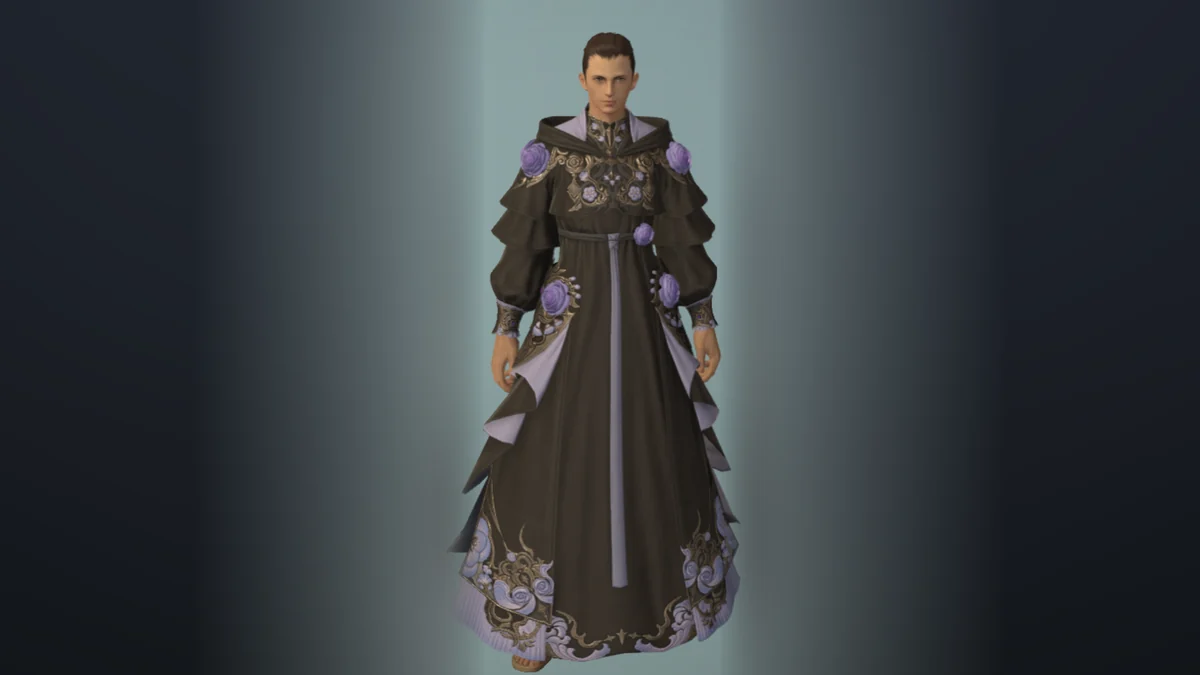
Courtly Lover's Longcoat of Casting. Image: Gamer Escape.
Quetzalli equipment is available from Ryubool Ja in Tuliyollal at X:13.9, Y:13.4 in exchange for sacks of nuts. Poetics remain obtainable from duties through level 90 and selected roulettes; use our Allagan Tomestones of Poetics guide when your shopping list involves that currency.
The FFXIV Glamour service handles collecting selected appearance pieces for you.
Seasonal and store equipment
The Online Store sells optional items including seasonal event items, and purchases arrive through in-game Mog letters. These purchases generally cannot be traded; the exception is Promise items associated with the Ceremony of Eternal Bonding. Select the intended item and recipient character before purchasing.
A full mailbox can block delivery: clear unwanted letters and use Reward Delivery Request. Each purchased item arrives in its own letter, and redelivery can take up to an hour within 10 days of purchase or up to 24 hours after that period.
Track favorites and missing pieces separately
Favorites save looks you want to return to, but Eorzea Collection does not provide an item-ownership checkbox for your personal progress. Keep a separate checklist beside your Lodestone profile and cross off each piece as you collect it.
FFXIV Collect tracks collections such as mounts, minions and achievements, while Garland Tools provides technical item lookup. We'd use a manual checklist for recreating one outfit: saving the look does not record which equipment pieces you already own.
Recreate the outfit in game
You can unlock glamour from level 15 through Swyrgeim in Western Thanalan at X:12.6, Y:14.3; she also offers Color Your World to unlock dyeing. If I Had a Glamour and the alternative A Self-improving Man route in Revenant's Toll provide the same glamour functionality and are mutually exclusive. Our FFXIV Glamour Guide: Unlock, Plates, Prisms and Dispellers covers the broader setup.
Get Glamour Prisms
Storm, Serpent and Flame Quartermasters sell Glamour Prisms for 200 Company Seals, each with a rank requirement for its company.
| Quartermaster | Location and required rank |
| Storm Quartermaster | Limsa Lominsa Upper Decks, X:13.1, Y:12.7; Chief Storm Sergeant. |
| Serpent Quartermaster | New Gridania, X:9.8, Y:11.0; Chief Serpent Sergeant. |
| Flame Quartermaster | Ul'dah – Steps of Nald, X:8.3, Y:9.0; Chief Flame Sergeant. |
Prisms are also tradable on the Market Board and obtainable with Wolf Marks, Bicolor Gemstones or Islander's Cowries. Crafting them is optional: it requires the relevant glamour recipe unlock, with Absolutely Glamourous or Submission Impossible opening access to the recipe books and Clear Prisms.
Store the appearance pieces
Glamour dressers are available in inn rooms, including those in Limsa Lominsa, Gridania and Ul'dah, and require Cast Glamour to be unlocked.
- Carry the appearance item and a Glamour Prism, unequip the item, and repair it to 100% durability.
- Open the dresser and locate the piece; use the Location selector for equipment stored in your Armoury Chest.
- Select the item and confirm its conversion, consuming one prism for that individual piece.
Conversion binds the item, removes materia and most aetherial bonuses, and resets spiritbond to zero, while preserving its dyes. The stored piece cannot be equipped until you retrieve it; Restore Item returns it to your inventory or Armoury Chest while keeping it bound.
The Armoire can also supply eligible stored equipment to glamour plates. Outfit glamours condense designated combinations into one dresser slot; since Patch 7.4, you can store partial sets and pay prisms according to the number of pieces added.
To expand a partial outfit, select Add Missing Outfit Gear from the dresser's subcommand menu, then choose Outfit Glamour on the pieces to add. A complete outfit's piece count appears orange, while an incomplete one appears white.
Save and apply a plate
- At the dresser, choose Edit Glamour Plates and select a numbered plate.
- Select a slot, choose its stored appearance from Gear Selection, and repeat for the pieces you want.
- Match the outfit's listed dyes and save the plate; you can leave slots unfilled.
- Equip the gear whose appearance you want to change, select the saved plate and press Apply.
You can access plates through the dresser or through the Glamour Plate button in your Character window while in a city. Defined slots change appearance when the equipped items satisfy the glamour requirements.
Change one piece without a plate
Carry both the base equipment and the appearance item in your inventory or Armoury Chest, plus a Glamour Prism. We'd use Cast Glamour for a single replacement and a saved plate for a recurring outfit: direct casting handles one piece, while plates apply a prepared combination.
- Open the base item's subcommand menu and select Cast Glamour.
- Choose the equipment retaining its stats on the left and the desired appearance on the right.
- Confirm the selection with Cast, consuming one prism.
The appearance item becomes bound, but an unbound base item does not become bound through this action. To remove the projection, carry a Glamour Dispeller and use Remove in the Cast Glamour interface; the dispeller is consumed.
Farm with same-region matching in Patch 7.58
Patch 7.58 was scheduled to bring same-region player matching to North America and Europe on November 10, 2026, following Japan's October 13 introduction. Duty Finder and Party Finder now draw from logical data centers within the same physical region, broadening the pool for duty groups and recruitment.
For another World within your region, use Visit Another World Server at the main aetheryte in Limsa Lominsa, Gridania or Ul'dah, then choose the logical data center and World from its dropdown. This route removes the need to return through your Home World, and World Visit restrictions apply at the destination.
Market Board rules did not change: you buy on the World you are visiting, but listings remain restricted to your Home World. Retainers and Delivery Moogle collections remain Home World functions too. Group recruitment and shopping therefore remain separate parts of collecting an outfit.
Common screenshot and browsing snags
Popular pieces recur across submissions, so searching beyond the highest-ranked results can uncover more variety. The site displays ads and offers paid support options that remove them.
For judging colors, favor the natural-looking reference shot: submission rules require a well-lit image resembling in-game colors in a suitable zone, and reshader use requires at least one neutral-looking screenshot. Zones can noticeably alter how equipment appears.
Creators must include the pieces needed to reproduce the look, and custom gear modifications, visibly altered character appearances and combinations requiring third-party circumvention of restrictions are prohibited. NPC or furniture props can still appear when identified in the description, so a pictured prop need not be wearable equipment.
If you submit your own recreation, use an in-game camera, remove HUD and character-name overlays, label race and gender correctly, and credit the outfit that inspired yours.