
Updated October 31, 2026 for the run-up to the WoW Forever launch on November 4, 2026. Written from the beta, which closed on October 23, 2026; details can change at launch.
WoW Forever addons tested in the beta include Questie, Details!, Bagnon, Leatrix Plus, ClassicUI Forever and EllesmereUI; these are pre-release options to consider for the November 4 launch. Forever supports addons through Mainline's UI architecture, with the combat API restrictions introduced in Midnight. Build around the functions you need, rather than installing every familiar name.
Which WoW Forever beta addons worked?
The October 29 selection demonstrated addons for questing, inventory, dungeon information, professions and interface customization based on beta use. Treat those demonstrations as a shortlist to check against the release build, since the beta closed on October 23, 2026.
| What you want to change | Beta-tested options |
| Quest and trainer information | Questie, What's Training?, Forever Quest Mark |
| Quest visibility and presentation | Forever Loot Sparkles, Forever Quest Tint, DialogueUI, Spoken |
| Bags and loot decisions | Bagnon, Loot Triage |
| Dungeon and gear planning | Dungeon Journal, AtlasLoot Forever, GearQuest Forever |
| Combat statistics and threat | Details! |
| Everyday convenience and maps | Leatrix Plus, MapUtils |
| Interface appearance | ClassicUI Forever, EllesmereUI |
| Auctions and crafting | Auctionator, SkillUp Forever |
Start with the smallest selection that solves your own problems. Leave overlapping replacements disabled until you have decided which presentation you prefer.
What the addon API allows and restricts
Forever shares Mainline's interface architecture and most of the APIs available in version 12.1.5. Its restrictions follow Midnight's approach, including limits on what combat addons can calculate during encounters.
Do not treat an addon with a familiar name as a compatible build. The pre-launch recommendation list includes addons from several WoW versions and explicitly calls for checking their compatibility on CurseForge.
WeakAuras and boss alerts
An October 18 beta test encountered frequent WeakAuras errors and could not establish its useful functionality or the extent of DBM's encounter support. That is a reason to test your intended setup, rather than make either tool a dependency before you have checked it.
DBM, BigWigs and other combat tools appear in community recommendations, but the broad October 27 list makes compatibility conditional on checking the individual version. Avoid reading a recommendation as a test of every feature you intend to use.
Try the built-in UI and cooldown manager first
Forever's beta interface includes damage and healing meters, a cooldown manager, a swing timer and combined bags. Edit Mode and the interface options already cover several functions that previously needed separate addons.
Try those tools before choosing replacements. Keep the default layout usable while you experiment, and add an addon only when you can name the extra control or information you want.
Details! adds threat tracking beyond the built-in damage meter, while Bagnon adds remote inventory and bank browsing beyond the combined-bag view. EllesmereUI offers its own customizable cooldown manager as part of a broader interface suite.
Questing, navigation and trainer information
Questie
Questie was updated for Forever and worked in the beta setup demonstrated on October 29. It flags quests that can be accepted and quests in progress on both the world map and the minimap, taking level and class restrictions into account, highlights enemies needed for objectives, and offers quest lists organized by zone so you can review what you've finished or let slip by.
Its pickup markers add information the default map does not provide. Choose it if finding the next quest is your main concern.
What's Training?
What's Training? lists spells and ranks you can learn immediately, those coming at later levels, their requirements and training prices adjusted for faction reputation discounts. It also includes weapon skills and information about spells and ranks available to warlock demons.
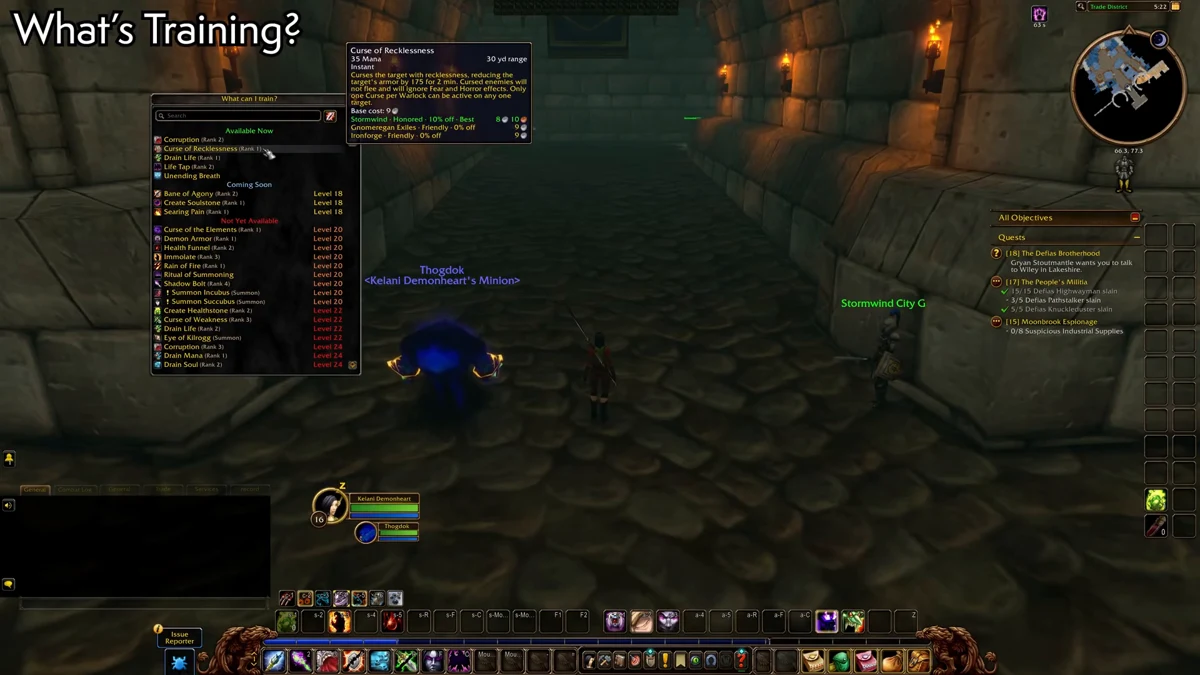
Screenshot: SignsOfKelani on YouTube.
Check it before making a trainer trip so you can decide which upgrades justify the journey.
Forever Quest Mark
Forever Quest Mark puts kill and loot objective icons on enemy nameplates without requiring a full quest-tracking replacement. You can adjust their placement, size and appearance.
Choose this narrower option if you want objective recognition while keeping the rest of your quest interface.
Forever Loot Sparkles and Forever Quest Tint
Forever Loot Sparkles enables visual sparkles for quest objects and certain NPCs, with additional options for herb and mining nodes; these sparkles are disabled by default.
Forever Quest Tint adds a blue accent at the bottom of quest dialogue to identify quests introduced in Forever.
MapUtils and Leatrix Maps
MapUtils reveals the map while allowing an overlay on unexplored areas, and marks flight paths, dungeon and raid entrances, boats and zeppelin connections.
Leatrix Maps is another beta-used option: it reveals zone maps, supports resizing, and shows flight paths and transportation routes while retaining an indication of explored areas. Pick one map presentation before layering further navigation tools over it.

Quest dialogue and voiceovers
DialogueUI
DialogueUI replaces the standard quest presentation with a larger dialogue frame, zooms toward the NPC, supports keyboard navigation and displays experience rewards. Use it when the readability and handling of quest conversations matter more than extra map markers.
Spoken
Spoken reads quest dialogue and NPC gossip aloud and can introduce a zone's story when you first enter it. Quest narration can continue after you close the quest window.
Install the companion voice modules as well as the main addon; the voices require those components. Its additional reading options cover books, and playback can be stopped, replayed or skipped through its controls.
Bags, loot and everyday convenience
Bagnon
Bagnon combines your bags and lets you inspect stored bank items, gold and alternate-character inventories remotely. That extra browsing is the reason to consider it after trying the game's own combined bags.
Baganator
Baganator offers searchable inventory organization with either a unified view or categories, plus sorting tools. It is an alternative for a layout organized around item groups rather than one continuous bag.
Loot Triage
Loot Triage becomes useful when you attempt to loot with full bags: it highlights your least valuable carried items and marks incoming loot worth more vendor gold than those items. Use that comparison when deciding what to discard.
Leatrix Plus
Leatrix Plus offers automatic quest acceptance and hand-ins, junk selling, repairs, and acceptance of summons or resurrections. Its beta options also include faster looting, blocking unwanted invitations or duels, camera and weather adjustments, and selective sound muting.
Enable individual conveniences deliberately. Check the behavior of automatic dialogue options before relying on them.
Dungeon quests, loot tables and gear planning
Dungeon Journal
Dungeon Journal provides dungeon maps, boss loot information and quests for both factions, including where to begin them and previews of quest chains. Use it before assembling a dungeon group so you can check the relevant quest starts.
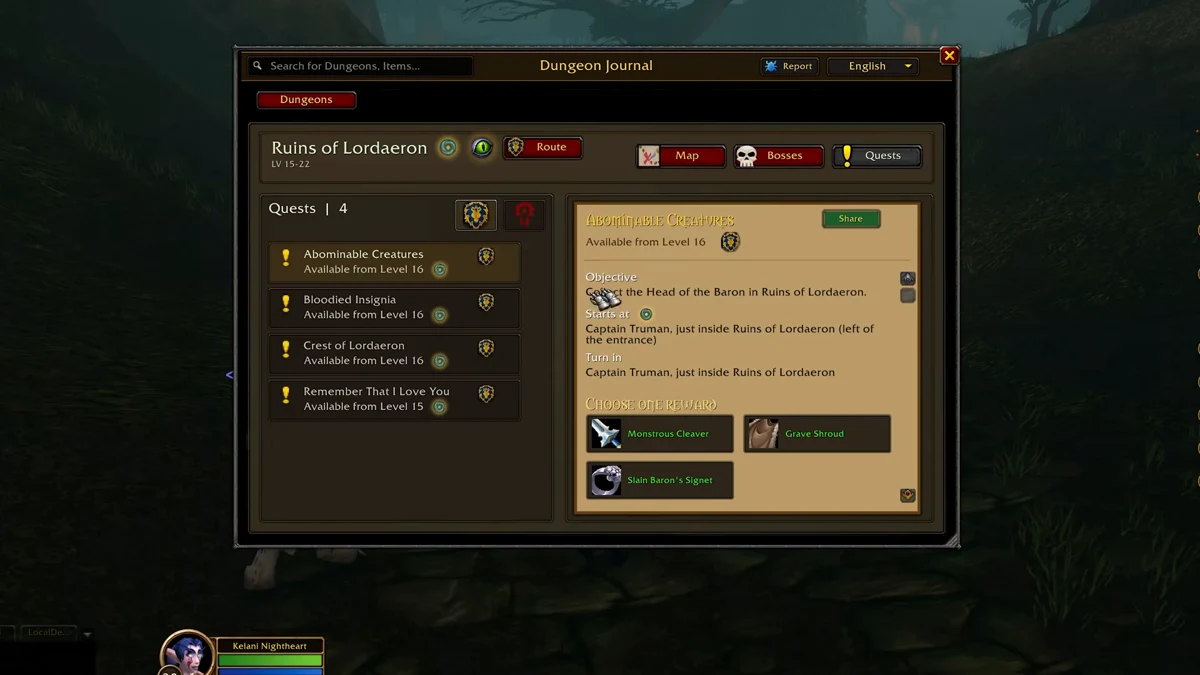
Screenshot: SignsOfKelani on YouTube.
AtlasLoot Forever
AtlasLoot Forever extends loot browsing across dungeons, raids, crafted equipment, faction rewards and PvP vendors. Neither it nor Dungeon Journal can reveal concealed loot that players have not yet discovered in the game.
Do not use an incomplete loot display as a reason to rule out an activity.
GearQuest Forever
GearQuest Forever suggests the top-tier gear you should aim for at your present level, pulling options from quest rewards, vendors and dungeons, and assigns each item a score so you can weigh it against what you already wear. You can change its activity settings, including excluding dungeon rewards.
Set those preferences before following its upgrade suggestions.
Talents Forever
Talents Forever lets you plan talent allocations without spending points, then save and share builds. Use it to compare alternatives before committing to a setup.
Damage, healing and threat tracking
Details!
Details! tracked group damage, healing and threat in the October 29 beta demonstration. Threat monitoring matters because tank threat generation in Forever is more limited than in Retail, and opening with unrestricted burst can pull enemies away from the tank.
Use the threat display to judge your opening rather than treating the damage ranking as your only feedback.
Forever Meter
Forever Meter offers damage, healing, absorbs, damage taken, avoidable damage, interrupts, dispels, deaths and threat displays, plus a DPS-only presentation. It supports up to four independently configured windows, fight or overall sessions, spell breakdowns, death recaps and an adjustable visual or audible threat warning.
Choose a meter for the information and layout you will actually check. Avoid filling your screen with multiple displays of the same statistic.
Classic appearance or a full UI replacement
ClassicUI Forever
ClassicUI Forever changes modern interface artwork toward the Vanilla style, including unit frames, the character panel, spellbook, map and profession windows. The beta version also offered extensive settings across interface areas such as quests, chat, maps and nameplates.
Choose it if restoring the older visual style is your priority.
EllesmereUI
EllesmereUI is a set of interchangeable modules that reworks your interface, including bars for abilities, player and target frames, enemy plates, the chat window and casting indicators, and it lets you pick from adjustable visual styles. Its settings can be reached by right-clicking individual interface elements, and it includes map tools.
Test one overhaul at a time. Settle your frame and bar layout before adding more cosmetic changes.
Auction and profession tools
Auctionator
Auctionator supports shopping lists, easier buying and selling, and full auction scans that supply item-price tooltips. It also presents material costs and crafting profit or cost information within profession windows.
Run a scan before depending on the stored auction values.
SkillUp Forever
SkillUp Forever adds recipe skill ranges and the percentage chance of earning a skill point to profession crafting windows. Use those figures when comparing recipes to craft next.
How to prepare your addon setup before launch
The WoW Forever release date is November 4, 2026; the demonstrations above describe beta use ahead of that date.
- Check each download's Forever compatibility instead of assuming another WoW version's package will work.
- Start with the default interface and identify what you want to change.
- Add a small selection, choosing one replacement for each overlapping job.
- Install any required companion components, including Spoken's voice modules if you use it.
- Check your frames, quest windows, maps and inventory after each addition.
- Save a usable baseline before experimenting with a complete interface overhaul.
Keep your initial selection focused. A familiar layout is useful only if you can still navigate it when one component fails.
What to do when an addon causes errors
BugGrabber captures addon Lua errors, and BugSack stores them for inspection; the pair was highlighted for diagnosing problems while Forever addons were being adapted during beta.
Disable your latest addition, check whether the problem persists, and re-enable optional tools one at a time. If two addons replace the same part of your interface, test each separately before trying them together.
Recheck the package's Forever compatibility before reinstalling it. Prefer a clean, understandable setup over repeatedly importing settings you cannot verify.
See also: WoW Forever Guide for Beginners: Tips, Setup and Rulesets