Blizzard's official WoW Forever guide for beginners takes you from a Battle.net account and active subscription through the experience preset, ruleset, character creation, first quests, combat and death, gear, professions and grouping. It is a broad orientation, not a full manual: it mentions campsites without the one-minute sitting rule, and it leaves mount prices and class-profession pairings to other pages. The game launched November 4, so treat the guide as the starting line and use the details below for the parts it skips.
Page updates
November 7, 2026
- Controller support: Controller support is in beta, with more improvements planned.
- Character creation: faction, race and class: At character creation, the Skyborne race chooses Horde-aligned Windshaper, which can be Shaman, or Alliance-aligned High-Order, which can be Mage.
How to sit at a campsite
To sit in WoW: Forever, press X, the default sit key, or type /sit. At a campsite, sit by the fire for at least 1 minute; that is the condition for gaining its Camp Feature benefits. The Camping system turns the Cooking profession's Basic Campfire into a shared campsite. Up to three Camp Features made with professions may be added by players close by, and each of those players supplies one. The buffs are mutually exclusive with their corresponding class buffs. One creator reports sitting beside a camp starts a one-minute countdown, cooking campfire items add more buffs, and gives a Spirit +14 example. If the sitting objective of The Great Outdoors quest does not register, players report that typing /sit again while already seated fixes it; our The Great Outdoors quest guide covers the quest and that fix.
What you need to play
Create a Battle.net account, verify your email, use a secure password and consider two-factor authentication. Access requires a World of Warcraft subscription that is active, or Game Time. Get the Battle.net desktop app, log in, set up World of Warcraft, then pick WoW: Forever from the game versions offered.
Windows and Mac are both supported for play using a keyboard and mouse; controller support exists in beta. Check the current system requirements before installing. The Skyborne race needs the Heroic Pack or a higher digital upgrade.
Experience preset
The first login asks you to choose Classic or Enhanced before you pick a ruleset. The preset changes presentation, not your ruleset.
| Preset | Starting settings |
| Classic | Simpler visuals, standard models, fewer modern interface features and less automatic guidance; quest guidance, one-bag view and transmog are off by default |
| Enhanced | Higher visual fidelity and more interface features; quest guidance, one-bag view and transmog are on by default |
We'd start with Enhanced unless you want the original look: it switches on quest guidance, one-bag view and transmog, and you can still adjust each setting. Individual settings can be changed later under Game Menu > Options, and the preset screen appears only after your first login.
Rulesets
Choose a ruleset before creating your character; it sets how PvP works and which community rules apply. Normal, PvP, Roleplay and Roleplay-PvP are the launch rulesets, with Hardcore coming later.
- Normal: You go adventuring and fight monsters; whether to take part in player-versus-player combat is your choice.
- PvP: The focus is player-versus-player combat, and opposing players may attack you across large parts of the open world.
- Roleplay: Rules cover names and behavior, aimed at those who wish to act as characters inside a fantasy setting.
- Roleplay-PvP: Roleplay naming and behavior rules combined with open-world conflict against the opposing faction.
- Hardcore: A high-stakes challenge where death can end a character's journey; additional details and timing were to be shared later.
Only players who share your ruleset and faction can group, join guilds, run dungeons, or raid with your characters, so talk with friends before you make characters. On the PvP ruleset, players can only create characters for one faction: once you create an Alliance character there, you can’t create a Horde character, and vice versa. We’d pick Normal for a first character unless you actively want open-world PvP: it leaves player combat at your discretion and is a welcoming place to learn.
Character creation: faction, race and class
Your faction sets which cities, communities and stories your character begins with; your race sets appearance, starting location and racial abilities; your class sets your role. New race-class combinations include Human Hunter, Dwarf Shaman, Gnome Priest, Orc Mage, Troll Warlock and Undead Paladin. If you roll Undead Paladin, almost all Horde Paladin trainers sit in the Undead zones; Dwarf Shamans are best started in Dun Morogh.
At character creation, the Skyborne race chooses Horde-aligned Windshaper, which can be Shaman, or Alliance-aligned High-Order, which can be Mage. Zephras Isle is the starting area for both, covering levels 1 to 12; entering it needs the Heroic Pack or a higher edition.
You may switch any character between HD and SD models; this changes looks alone, with no effect on skills or advancement, and you can alter it at a Barbershop or in the Options Menu. A name consists of two sections, and the complete pair has to be unique in your region; the secondary name can be concealed via Options > Nameplates > My Secondary Name, but chat will still show it. Both parts must follow the Code of Conduct, and full-name combinations go to the first claimer. Read the character creation options before you commit.
Starting zones by race
- Human: Elwynn Forest
- Dwarf and Gnome: Dun Morogh
- Night Elf: Teldrassil
- Skyborne: Zephras Isle, level 1–12
- Orc and Troll: Durotar
- Tauren: Mulgore
- Undead: Tirisfal Glades
Any character can reach any starting zone of its faction from level 1, and travel usually takes 10 to 25 minutes. Skyborne routes pass Valanaar and Dalaran, and the Hillsbrad Foothills stretch has high-level hostile mobs to avoid. Elwynn Forest ranks first and Durotar last in one ranking of starting zones.

Quests and first steps
NPCs with an exclamation point offer quests; accepting one adds it to the Quest Log and shows objectives on screen. Press L for the full log, track or untrack quests, and abandon quests when the log fills. The world map, opened with M, shows quest markers; nearby goals appear on the minimap, and a question mark indicates that you can hand in a finished quest.
The main route to reach level 60 is through quests, which also help you get to know the world; therefore, take quests close by whenever you are in a zone. Read quest text for clues, and watch enemy levels when you leave the road.
Combat, death and repair
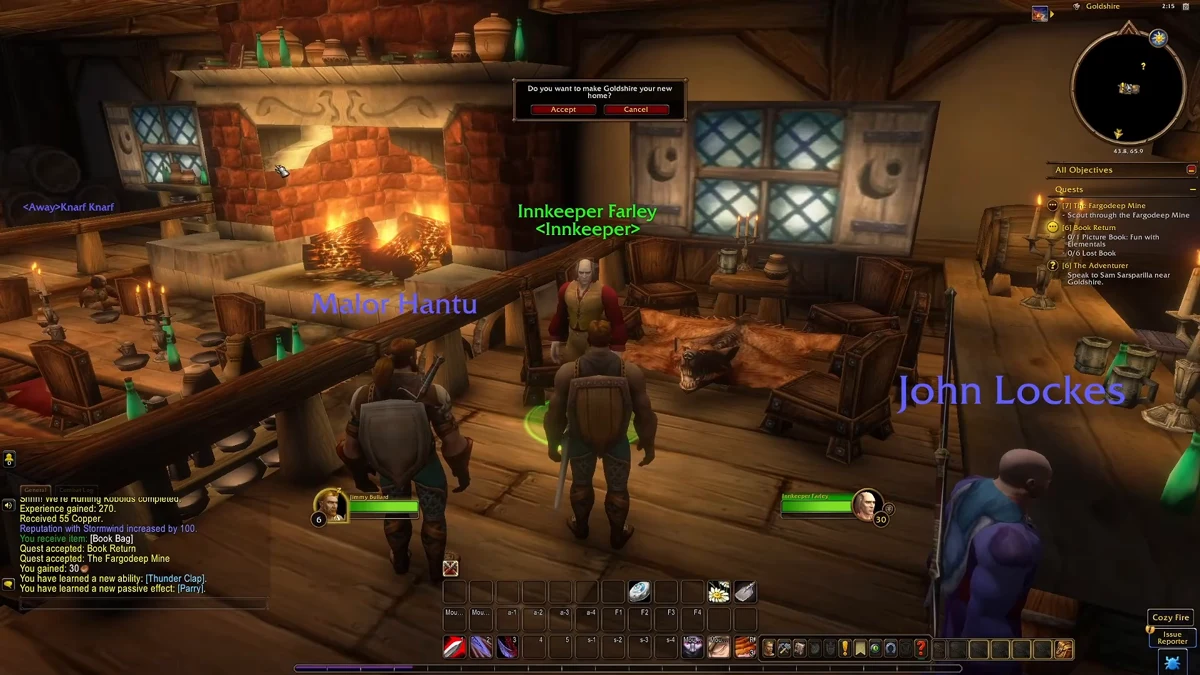
Place frequently used abilities on the action bar and read each tooltip; press P for the Spellbook and drag abilities to the bar. Visit a class trainer as you level to learn new abilities; trainers add a new ability every 2 levels, so try each one before adding many buttons. Carry food and drink, and bind your Hearthstone at an innkeeper so you can return. Pull one enemy at a time while learning.
If you die, release at a nearby graveyard, follow the corpse marker or press M, and select Resurrect near your body. The Spirit Healer can resurrect you at the graveyard, but that damages equipment durability and may apply Resurrection Sickness, which lowers effectiveness; avoid combat until it expires.
How to repair gear
Vendors with an anvil icon repair damaged equipment for a fee; right-click the vendor and choose repair. If you cannot afford a full repair, open your character panel with C and repair individual pieces. Repair after a Spirit Healer resurrection, since that resurrection damages durability.
Gear, bags and vendors
Hover an item in your bags to compare it with equipped gear, checking armor type, weapon compatibility and class attributes; higher quality is not always better. Right-click to equip, or drag to the matching slot; press C for the Character panel. Right-click a vendor to buy or sell, check Buyback if you sold by mistake, and sell gray items. Sell junk in one go with the junk button, and use the bag cleanup button to tidy.
Keep unusual items until you understand them; a guide notes Forever has set pieces that matter later. At the Auction House, buy gear from players, list items unless soulbound, and buy bank bag slots when bags fill. Prices are player-set, so check the cheapest listing.
Professions
A character may take up two main professions as well as every one of the three secondary professions. Gathering covers Herbalism, Mining and Skinning; crafting covers Alchemy, Blacksmithing, Enchanting, Engineering, Leatherworking and Tailoring; secondary professions are Cooking, Fishing and First Aid. Press K for the Professions interface, and train in a starting area or major city. Start professions early rather than backtracking to old zones.
A node's color shows its skill-up chance: orange is sure, yellow likely, green unlikely, gray none, and red too high. Skinning needs a skinning knife, mining needs a pick, and fishing needs a rod. Visit the weapon master in Orgrimmar or Stormwind to learn more weapon types. We'd pair a gathering profession with a craft that matches your armor: Blacksmithing for Warrior or Paladin, Leatherworking for Hunter or Rogue. If you want to hand off the gathering or crafting grind, WoW Forever professions is a service that takes that work off your hands.
Grouping, dungeons and emotes
Invite nearby players, join a guild, or ask in chat; grouping makes difficult quests easier and opens dungeons. Dungeon groups are generally five players: a tank, a healer and damage dealers. To join a group or advertise yourself, use the group browser or a meeting stone; dungeons provide quests and equipment. Forever keeps Classic-style tagging, so the first player or group to tag a mob gets credit.
Campsites bring players together to rest, share profession benefits and trade. Emotes use slash commands such as /wave, /cheer, /dance or /thank, and /emote plus text makes a custom emote. If a dungeon run is out of reach, a WoW Forever dungeon carry can handle the group and the clear for you.
Controller support
Controller support is in beta, with more improvements planned. All XInput-compatible controllers work, with Xbox and PlayStation button icons. Switch at Escape > Options > Gamepad. The gamepad HUD has four action bars; hold LT, RT or both to switch, and three action bar sets give 84 slots. Chat still needs a keyboard.
What the guide leaves out
The starter guide names campsites but not the one-minute sitting rule or the three-feature limit that the launch overview gives. For mount prices, one creator reports the level 40 mount costs 95 gold and the level 60 mount 950 gold from the race's mount trainer, with no flying mounts.
It does not pair professions with classes; a general guide recommends Blacksmithing for Warrior or Paladin and Leatherworking for Hunter or Rogue. It gives no zone routes; another guide covers reaching any faction starting zone at level 1 in about 10 to 25 minutes. For routes through the early zones, see the WoW Forever leveling guide.
What players report about rulesets
Players on the official WoW: Forever forums report that the ruleset choice is permanent, with Hardcore death the only way to move a character to another ruleset (4 players). Three players report each ruleset works like its own server, with separate auction houses and no cross-ruleset interaction. In their words: "We also have separate Auction Houses for each ruleset to. If it helps think of it as 4 servers. Those server names are PvE, PvP, RP, and Hardcore."
Two players report paid character transfers between rulesets will be possible, including PvE to PvP, while one player reports the ruleset can be changed from the character select screen. Five players view RP servers as more immersive and less toxic than normal servers.

Frequently Asked Questions
Do I need to buy WoW: Forever separately?
Access comes with Game Time or an active World of Warcraft subscription; the Skyborne race needs the Heroic Pack or a higher upgrade.
Is Forever replacing Classic Era?
No. Forever is a permanent home alongside modern and Classic WoW, and your subscription or Game Time covers both Forever and the modern game.
Can I change my experience preset after the first login?
The preset screen appears only after your first login, but individual settings can be changed later under Game Menu > Options.